
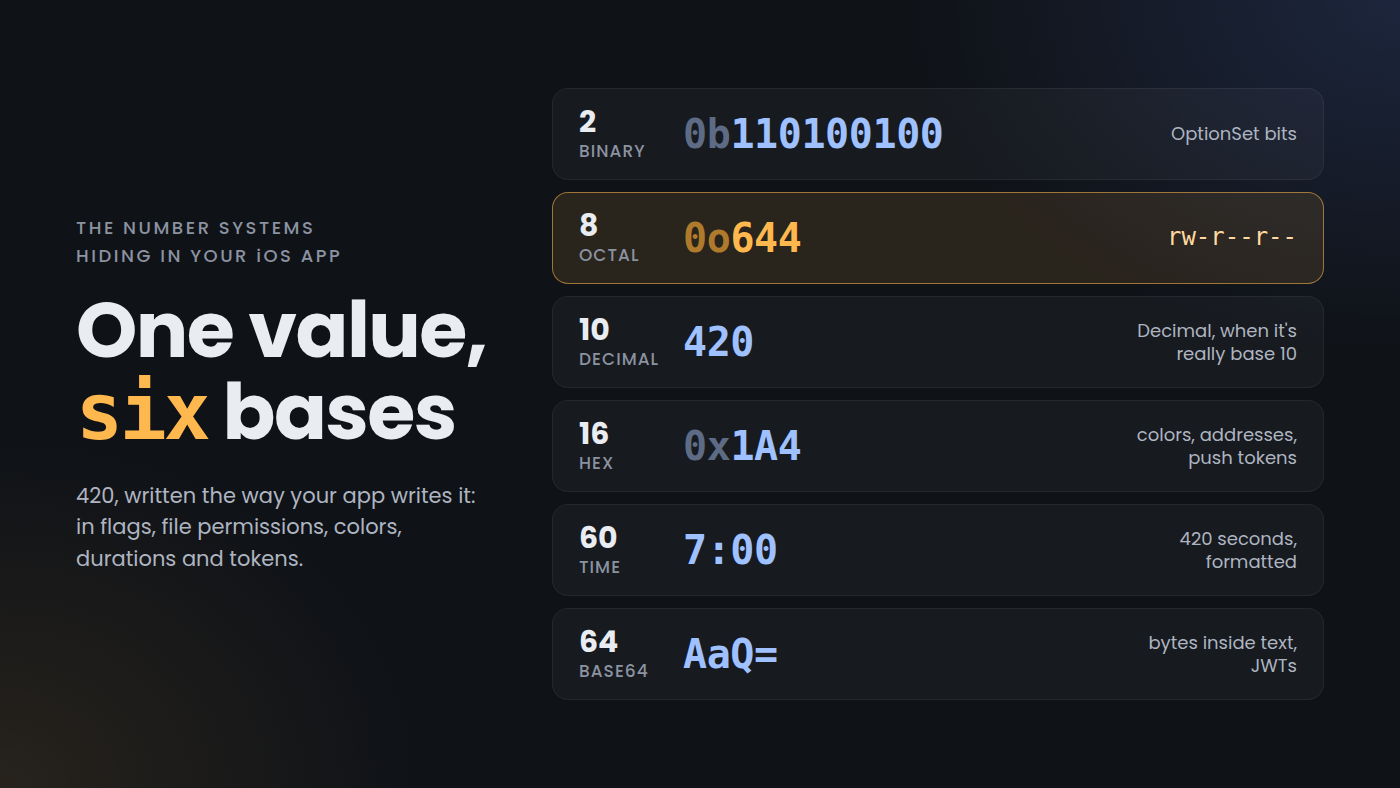
An interviewer once asked me which number systems I use in app development. I mentioned a couple of them, then stalled. I knew there were more, but in the moment nothing else came to mind.
The reason is that most of them sit behind an API that converts for you. You pass 0o644 to FileManager, format a device token with %02x, decode a JWT, or show a duration as 1:02:05, and none of it feels like working in another base. It is, and most of the bugs in this area come from forgetting that.
Here they are, from the smallest base up:
- Base 2, binary: option sets and flags.
- Base 8, octal: file permissions.
- Base 10, decimal:
Decimal, and less often than you'd think. - Base 16, hex (hexadecimal): colors, memory addresses, push tokens and hashes.
- Base 24 and 60 (sexagesimal, not sexygesimal 😉): durations.
- Base 64: bytes inside text, and JWTs.
Binary: every OptionSet is a bitmask
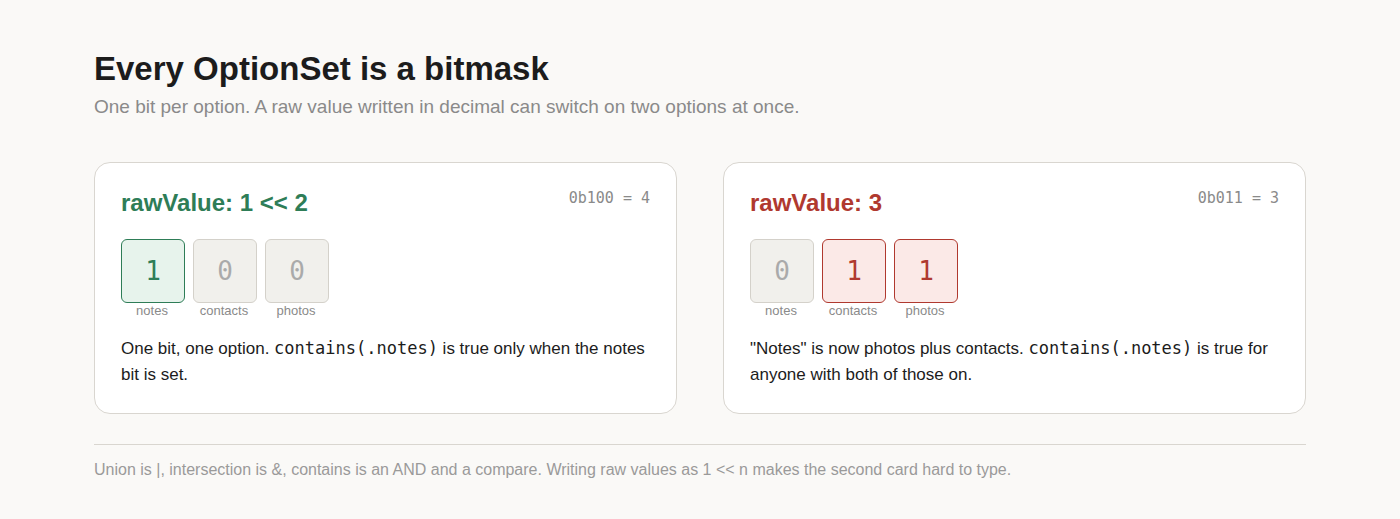
Every OptionSet in UIKit and Foundation is an integer with one bit per option: UIRectCorner, UIView.AutoresizingMask, NSString.CompareOptions. Yours works the same way.
struct Sync: OptionSet {
    let rawValue: Int
    static let photos   = Sync(rawValue: 1 << 0) // 0b001
    static let contacts = Sync(rawValue: 1 << 1) // 0b010
    static let notes    = Sync(rawValue: 1 << 2) // 0b100
}

var enabled: Sync = [.photos, .notes]  // 0b101
enabled.contains(.notes)               // true
enabled.rawValue.nonzeroBitCount       // 2
Union is |, intersection is &, and contains is an AND followed by a comparison. That's why an option set costs one integer no matter how many options are switched on, and why it survives a round trip through UserDefaults as a plain Int.
The bug I've seen in real code is a raw value written in decimal by someone counting options instead of bits:
static let notes = Sync(rawValue: 3) // should be 43 is 0b011, which is photos and contacts together. Nothing crashes. enabled.contains(.notes) just returns true for any user who has both of the other two turned on. Writing raw values as 1 << n makes this mistake hard to type, which is the reason for the convention.
Octal: file permissions, and the 0644 trap
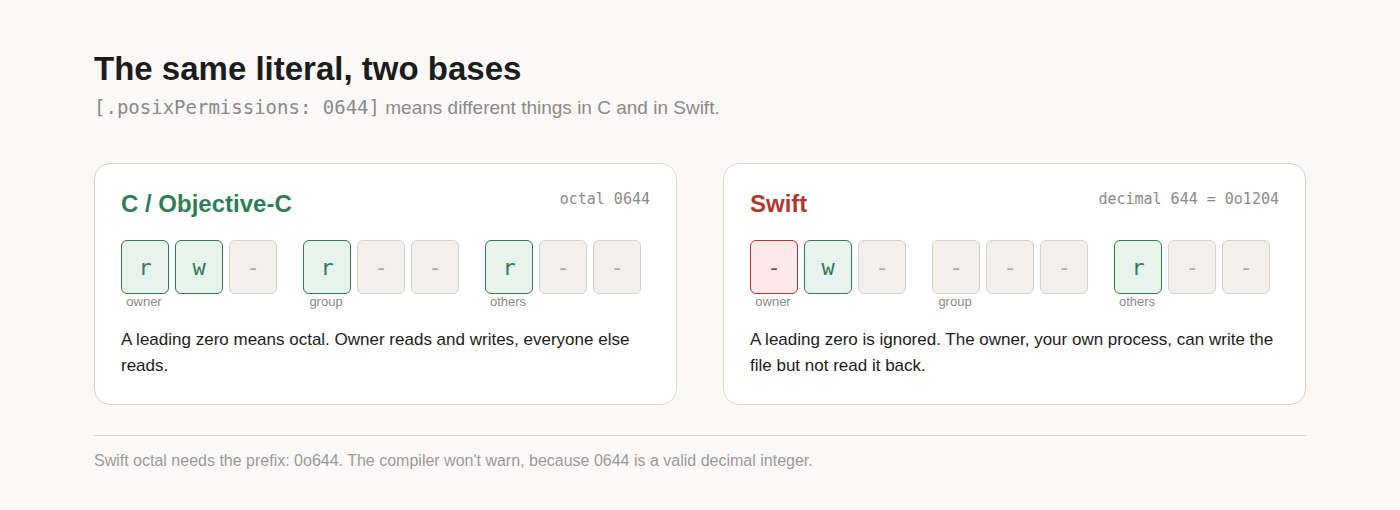
Octal survives in exactly one place most iOS developers touch: POSIX permissions. Each digit is three bits, read, write and execute, for owner, group and others. 644 means the owner can read and write and everyone else can read.
In C and Objective-C a leading zero makes a literal octal, so 0644 is the right value and every man page and Stack Overflow answer writes it that way. Swift dropped that rule. Octal needs the 0o prefix, and a leading zero is simply ignored.
// Swift has no leading-zero octal. This is decimal 644.
try FileManager.default.setAttributes(
    [.posixPermissions: 0644],
    ofItemAtPath: path
)

// What you meant:
[.posixPermissions: 0o644]  // rw-r--r--
Decimal 644 is 0o1204. The low nine bits, 204, give the owner write but not read, the group nothing, and others read. The leading 1 is the sticky bit, which is meaningless on a regular file. The compiler has no reason to warn, because 0644 is a perfectly valid integer.
The symptom shows up somewhere else entirely. Your app writes a file, tightens its permissions, and the next read of that file fails with a permission error, because your process is the owner and the owner can no longer read. If the code was ported from Objective-C, or copied from a shell script, a search for : 0[0-7]{3} across the project is worth running.
Decimal: less of it than you think
Decimal was one of the systems I did name in the interview, and even that answer was mostly wrong. Most of the numbers I'd call decimal are stored in binary.
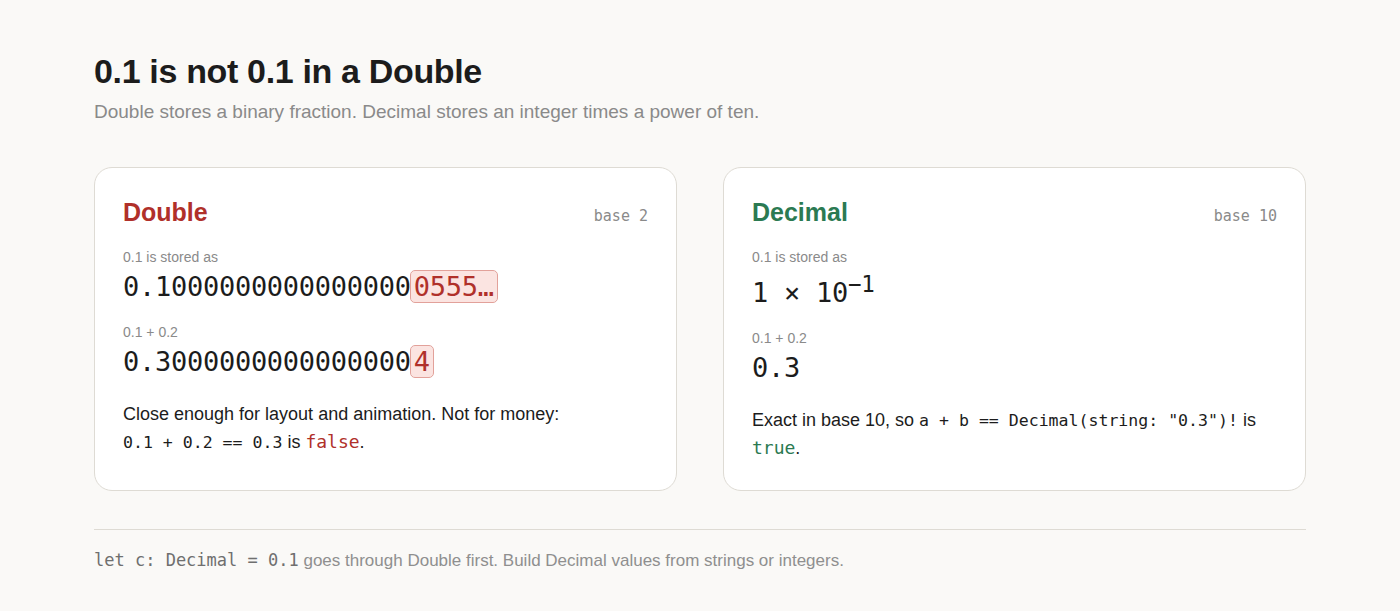
Double is binary floating point. It stores a number as a binary fraction times a power of two, and 0.1 has no exact binary representation, the same way 1/3 has none in decimal.
0.1 + 0.2 == 0.3 // falseDecimal really is base 10: an integer mantissa times a power of ten. That's why it's the type for money, where a customer will notice a cent going missing.
let a = Decimal(string: "0.1")!
let b = Decimal(string: "0.2")!
a + b == Decimal(string: "0.3")!  // true

let c: Decimal = 0.1  // goes through Double first
The last line is the trap. Decimal conforms to ExpressibleByFloatLiteral, and a float literal in Swift is built as a Double before it reaches the initializer. So let c: Decimal = 0.1 carries the binary rounding error into a type you chose specifically to avoid it. Build decimal values from strings or from integers with an exponent, and decode prices from JSON as strings when you control the API.
Hex (hexadecimal): colors, addresses and tokens
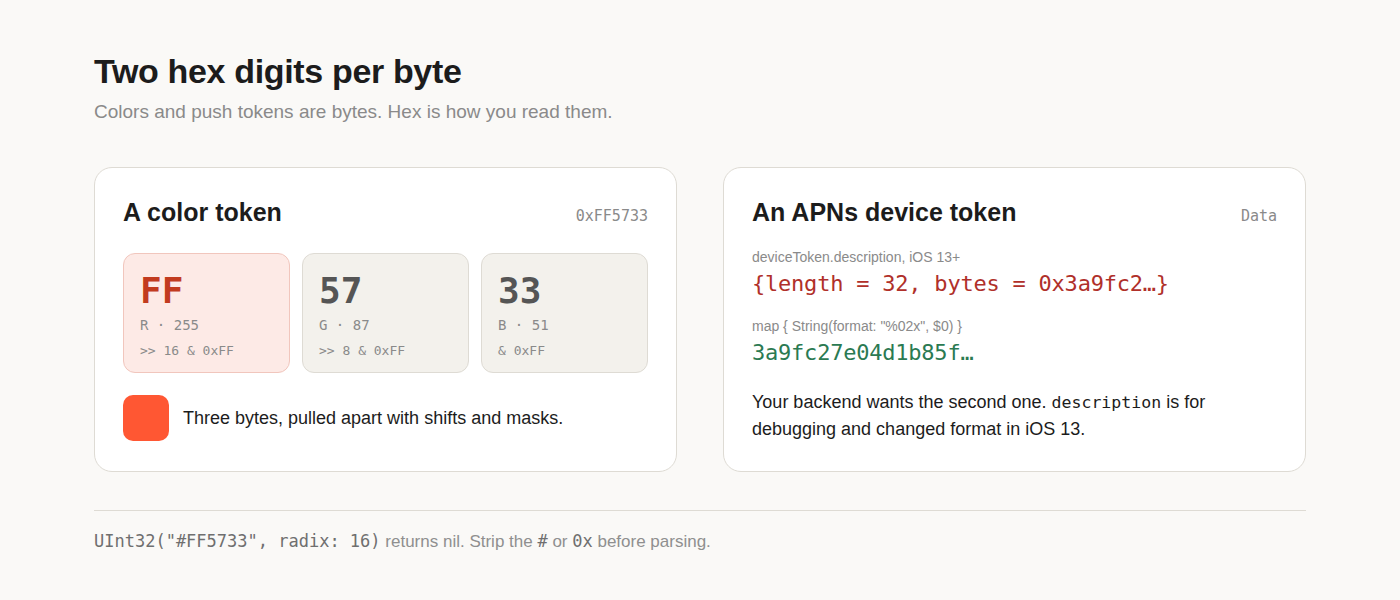
Hex is the base you read most without noticing, because it's how bytes get printed. Two hex digits per byte, so it's the most compact human-readable form of binary.
Design tokens are the first place you meet it. 0xFF5733 is three bytes, and pulling them apart is shifts and masks:
extension UIColor {
    convenience init(hex: UInt32) {
        let r = CGFloat((hex >> 16) & 0xFF) / 255
        let g = CGFloat((hex >> 8) & 0xFF) / 255
        let b = CGFloat(hex & 0xFF) / 255
        self.init(red: r, green: g, blue: b, alpha: 1)
    }
}
When the value comes from JSON as a string, UInt32("FF5733", radix: 16) parses it, and UInt32("#FF5733", radix: 16) returns nil. The same goes for a 0x prefix. The radix initializer accepts digits and an optional sign and nothing else, so strip the prefix first.
The second place is the debugger. Every address LLDB prints is hex, and so is memory read. LLDB's format suffixes make the base explicit: p/x 255 prints 0xff, p/t 5 prints the bits with a 0b prefix, and p/o 420 prints 0644, with the C-style leading zero. That last one is a quick way to check a permissions value when you're not sure which base it's in.
The third is anything you send to a server as raw bytes. An APNs device token is 32 bytes, and your backend expects it as 64 hex characters:
let token = deviceToken
    .map { String(format: "%02x", $0) }
    .joined()
For years a lot of apps built that string from deviceToken.description, stripping <, > and spaces from what NSData printed. iOS 13 changed description to {length = 32, bytes = 0x...}, and every one of those apps started sending garbage tokens. description is for debugging, so do the conversion yourself. The same map works for a CryptoKit SHA256.hash(data:) digest.
Base 60 (sexagesimal), 24 and 7: time is mixed radix
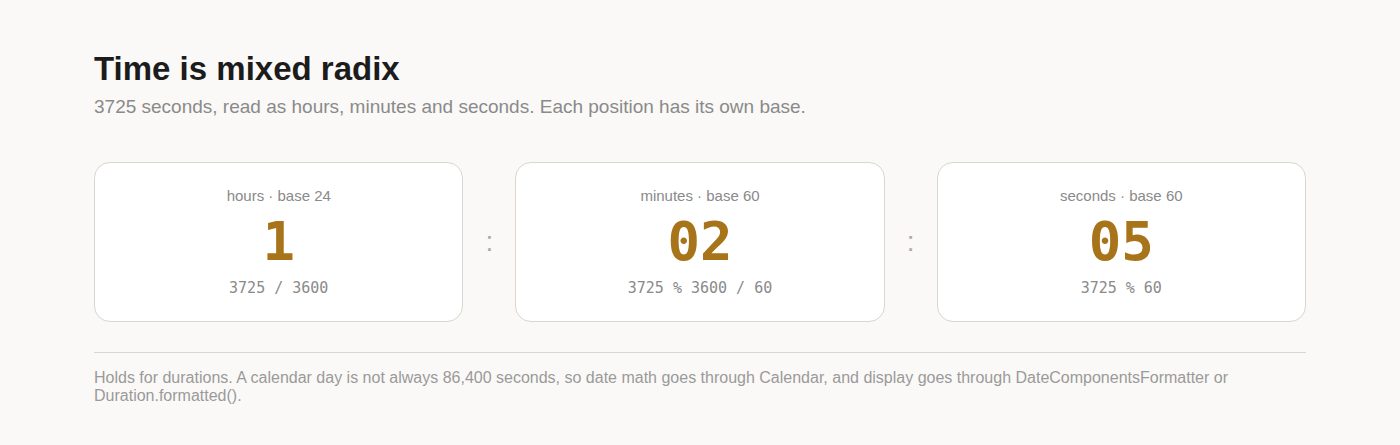
A duration in seconds is a number in one base. A clock face shows it in three at once: seconds and minutes count to 60, hours to 24, and days to 7 if you go that far. That's a mixed-radix system, the same kind as feet and inches.
3725 seconds is 1 hour, 2 minutes and 5 seconds. By hand:
let h = t / 3600
let m = t % 3600 / 60
let s = t % 60
That's correct, and it's still the wrong code to ship, because the output is a user-facing string. DateComponentsFormatter and, from iOS 16, Duration.formatted() do the same division and then localize the separators and digits:
let f = DateComponentsFormatter()
f.allowedUnits = [.hour, .minute, .second]
f.zeroFormattingBehavior = .pad
f.string(from: 3725)  // "1:02:05"

Duration.seconds(3725)
    .formatted(.time(pattern: .hourMinuteSecond))
The mixed-radix model only holds for durations. Past hours, it breaks down: a calendar day is not always 86,400 seconds, because of daylight saving transitions, and a month has no fixed length at all. Adding 86_400 * 7 to a Date gives you the wrong wall-clock time twice a year in any time zone with daylight saving. For anything anchored to a calendar, Calendar.date(byAdding:value:to:) is the only correct answer.
Base64, and base64url
Base64 packs 3 bytes into 4 printable characters, using 64 symbols: A to Z, a to z, 0 to 9, + and /, with = padding at the end. It's what you use to put bytes into JSON, a data URL or an HTTP header, and it makes the payload about a third larger.
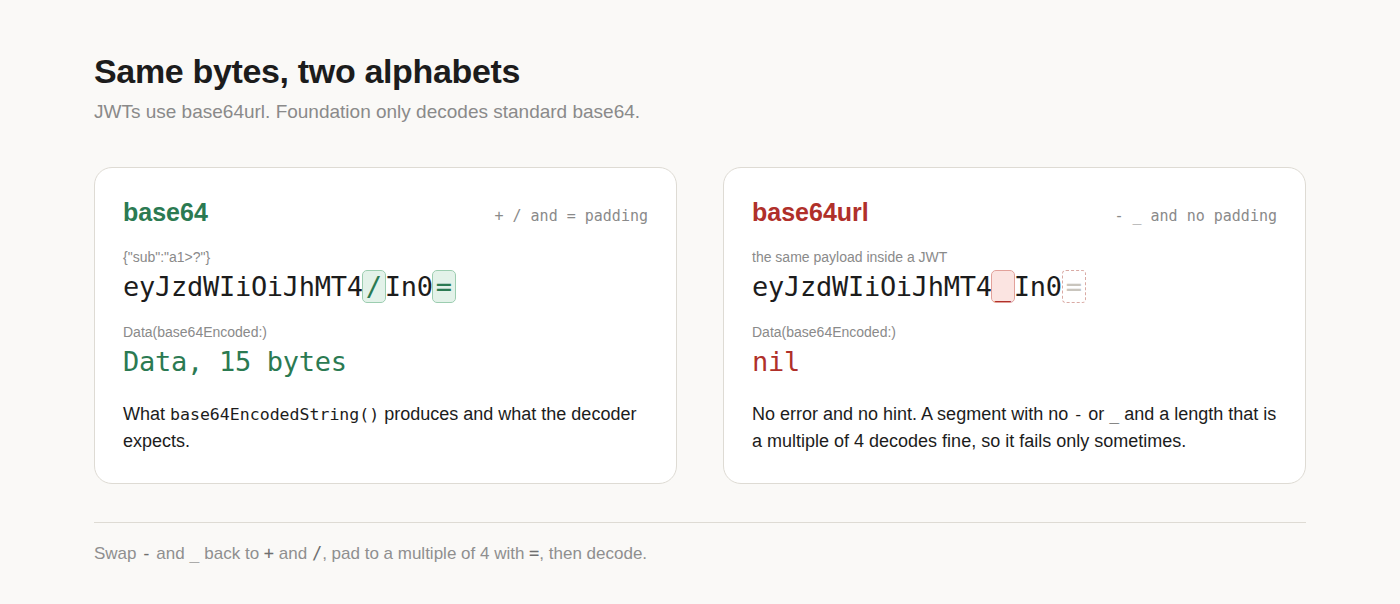
Foundation covers the standard form with base64EncodedString() and Data(base64Encoded:). The trap is that JWTs don't use the standard form. They use base64url, which swaps + and / for - and _ so the token is safe in a URL, and drops the padding.
Take the middle segment of a real token, pass it to Data(base64Encoded:), and you usually get nil. There's no error and no hint why. It works on some tokens and fails on others, depending on whether the payload happens to contain those characters and whether its length is a multiple of four.
func base64URLDecoded(_ s: String) -> Data? {
    var b64 = s
        .replacingOccurrences(of: "-", with: "+")
        .replacingOccurrences(of: "_", with: "/")
    b64 += String(repeating: "=",
                  count: (4 - b64.count % 4) % 4)
    return Data(base64Encoded: b64)
}
The reverse applies when you build a token or a signed URL yourself: encode with base64EncodedString(), then swap the characters and strip the =.
What I'd answer now
Binary for option sets and flags. Octal for file permissions, written with 0o because Swift ignores a leading zero. Decimal, but only when I use Decimal, because most of the numbers I call decimal are stored in binary. Hex for colors, memory addresses and anything that prints bytes, like push tokens and hashes. Base 60 and 24 for durations, with a formatter in front. And base64 for bytes inside text, with base64url for JWTs, which Foundation won't decode directly.